


In 2025, building a strong online presence is easier than ever with the Shopify Website Builder. Whether you’re looking to build a site for free or customize your store, Shopify offers an intuitive platform to build Shopify themes and launch a scalable Shopify website tailored to your brand. Especially for markets like Shopify India, this powerful website builder simplifies e-commerce setup, combining user-friendly design with robust functionality. From beginners to seasoned sellers, Shopify helps you create a professional online store that drives sales and growth effortlessly.
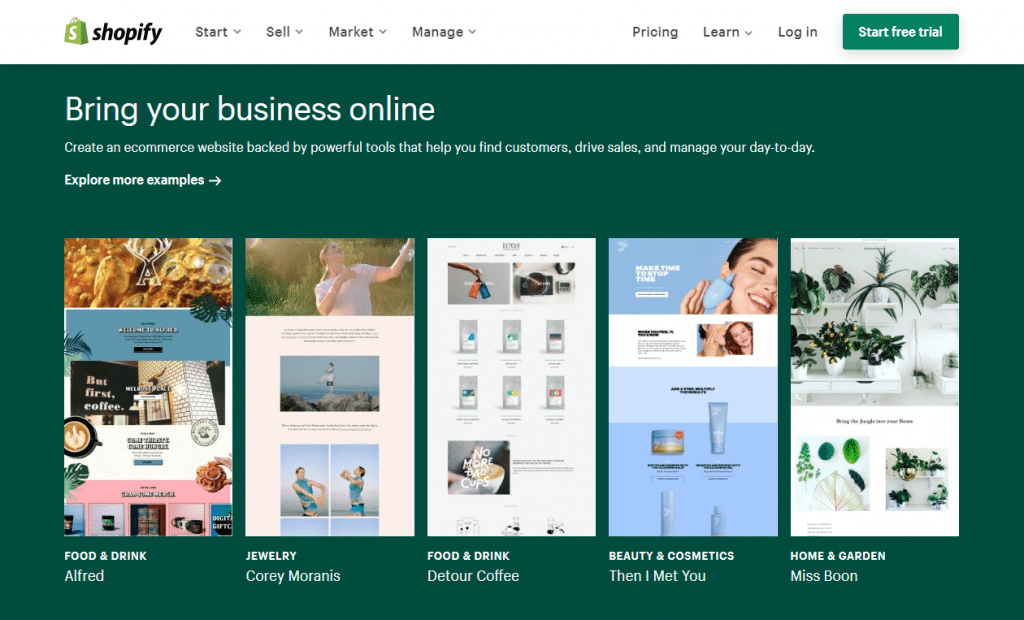
In this comprehensive guide, we’ll explore everything you need to know about Shopify’s website builder from setup to customization, marketing strategies, and more. Plus, we’ll take a close look at how Shopify stacks up against competitors like Wix, and how you can build a site for free during the trial period. You’ll also learn how to build a Shopify theme that fits your brand, even when working on a budget.
The Shopify website builder is an all-in-one platform designed to help you build a site for free, create, customize, and manage an online store. It’s equipped with features catering to beginners and experts alike, allowing you to easily build a Shopify theme and enjoy a seamless experience from start to finish.
At its core, Shopify provides:
Unlike traditional website builders, which may require significant coding knowledge or third-party plugins for e-commerce functionality, Shopify streamlines the entire process. It eliminates technical barriers, allowing anyone to build a site for free during the trial period and later build a Shopify theme that fits their brand. The result is a website that’s not only beautiful but also fully functional and optimized for sales.
What really sets Shopify apart is its scalability. Whether you’re just starting out by choosing to build a site for free or ready to customize and build a Shopify theme for a growing brand, Shopify grows with you. From small start-ups to major businesses, it supports companies at every stage of their journey.
When choosing a platform to build your online store, the decision often comes down to Shopify vs. other popular builders most notably, Wix. Here’s how they compare:
Wix vs Shopify
| Feature | Wix | Shopify |
| Ease of Use | Known for its intuitive drag-and-drop builder, it is ideal for creating visually appealing sites. | Offers a similarly easy-to-use interface with powerful built-in e-commerce functionalities. |
| E-commerce Capabilities | Provides basic e-commerce features suitable for small businesses. | Designed specifically for online stores with advanced inventory tools, payment integrations, and scalability. |
| Customization Options | Allows broad visual customization without requiring coding expertise. | Supports deeper customization using Liquid, CSS, HTML, and Polaris for responsive and consistent interfaces. |
In summary, if your primary goal is to build and grow a successful online store, Shopify is the more robust and future-proof option.
Creating a website using Shopify is a user-friendly and efficient process, whether you’re a beginner or an experienced entrepreneur. Here’s a more detailed breakdown of how to launch your Shopify store:
Begin by visiting Shopify.com and clicking the “Start Free Trial” button. You’ll be prompted to enter basic details such as your email address, password, and store name. Shopify offers a trial period (usually 3 to 14 days), which lets you explore the platform without any upfront cost.
During the trial, you can:
Once you’re comfortable and ready to commit, choose a paid plan. Shopify offers several pricing tiers:
Your plan choice affects features like staff accounts, reporting tools, and transaction fees.
After signing in, go to the “Online Store” → “Themes” section in your admin dashboard. Here, you’ll find:
Choose a theme that reflects your brand’s look and feel. Then, use the drag-and-drop theme editor to make adjustments without needing coding knowledge. You can:
This step is crucial for creating a professional and trustworthy storefront that resonates with your target audience.
Go to the “Products” section to start adding your inventory. For each product, provide:
After adding products, organize them into collections to enhance navigation and boost sales. Examples include:
Collections can be manual (you handpick products) or automated (based on conditions like price, tags, or product type).
Set up payment gateways so you can accept payments online. Shopify supports:
Next, configure shipping settings under “Settings” → “Shipping and Delivery.” You can:
Proper setup ensures smooth checkout and avoids customer confusion.
Before going live:
Once satisfied, remove the password protection under “Preferences” in the Online Store settings, and hit Publish.
Your store is now live! Begin promoting it using:
Your store’s design is the first impression customers get, and Shopify themes play a vital role in defining that visual identity. A well-designed theme isn’t just about aesthetics it directly impacts navigation, user experience, and conversion rates.
The right theme enhances your store’s usability and ensures your brand is instantly recognizable. It affects how users interact with your site, how easily they browse products, and how fast they move from interest to checkout. A clean, intuitive, and responsive theme builds trust and keeps shoppers engaged.
For developers, Shopify offers deep customization using Liquid, its proprietary templating language, along with HTML, CSS, and JavaScript. You can build a theme entirely from scratch or customize existing ones. Shopify’s Polaris design system helps maintain consistent user interface components, ensuring your theme looks professional across all devices and screen sizes.
Shopify’s built-in drag-and-drop theme editor is ideal for non-developers. It allows users to change images, fonts, colors, and layout sections effortlessly without coding skills. You can preview changes in real-time and publish them instantly.
Investing time in your theme ensures a seamless shopping experience and helps convert visitors into loyal customers.
1. Exploring Shopify’s Free Trial
Shopify offers a 3-day free trial, during which you can explore the dashboard, create a store, and test features without spending a dime.
2. Limitations of the Free Version
You can’t process real orders or use custom domains without choosing a paid plan. However, you can build the core of your site.
3. When to Consider Upgrading
When you’re ready to accept orders and go live, it’s time to pick a plan. Plans start affordably and scale as your business grows.
4. Tips to Build a Site for Free Effectively
The Shopify App Store offers thousands of apps to extend your store’s functionality.
Must-Have Apps
Integrating Third-Party Tools
Use apps to integrate accounting tools, CRM platforms, or inventory management systems. These tools help streamline business operations and improve efficiency.
One of the best ways to understand the true potential of the Shopify website builder is by exploring real-world success stories. From household names to fast-growing niche brands, thousands of thriving businesses rely on Shopify to power their online stores. These success stories highlight how robust design, marketing strategies, and tools offered by the Shopify website builder can create an impactful customer experience and drive significant revenue.
Let’s explore three standout Shopify brands making waves in the e-commerce world and extract actionable lessons from their journeys.
1. Allbirds: Sustainable Style Meets Simplicity
Industry: Footwear & Apparel
Website: allbirds.com
What Makes Them Stand Out:
Allbirds is known for its commitment to sustainability and eco-friendly materials. The brand promotes transparency in how its shoes are made using natural materials like merino wool and eucalyptus fiber and Shopify allows them to share that story seamlessly throughout the customer journey.
Their Shopify-powered website uses a minimalist design that mirrors their brand ethos. Clean product images, ample white space, and concise messaging make the user experience intuitive and calming. They also highlight each product’s carbon footprint, which resonates with eco-conscious consumers.
Key Shopify Features Utilized:
Lesson:
Great branding doesn’t just look good it communicates your values. Align your Shopify store’s visuals and copy with your mission for stronger emotional engagement.
2. Gymshark: A Fitness Brand that Scaled Globally
Industry: Sportswear & Fitness Apparel
Website: gymshark.com
What Makes Them Stand Out:
Gymshark began as a small startup in the UK and quickly grew into a fitness powerhouse, largely due to clever branding, influencer partnerships, and high-performance e-commerce execution.
Built on Shopify Plus, Gymshark’s website is designed for speed, scalability, and conversion. From lightning-fast product pages to mobile-optimized checkout flows, every interaction is streamlined to support high traffic volumes during product drops and promotions.
They also integrate their store with Instagram Shopping and TikTok ads, capitalizing on their massive social media presence to drive traffic and sales, all while using Shopify’s features to build a site for free and customize a powerful Shopify theme that supports seamless social commerce.
Key Shopify Features Utilized:
Lesson:
Leverage social media and Shopify’s integrations to create a seamless omnichannel experience. Scalability is critical, especially during high-traffic sales events.
3. ColourPop: Beauty Meets Community
Industry: Cosmetics & Skincare
Website: colourpop.com
What Makes Them Stand Out:
Colour Pop has mastered the art of community-driven marketing. They’ve built a loyal customer base by engaging users through social media, reviews, and influencer collaborations. Using Shopify, they were able to build a site for free during the initial setup and later customized it further to match their vibrant brand. With the flexibility to build a Shopify theme tailored to their audience, they translated that engagement into an exciting, high-converting on-site experience.
Their product pages feature rich visuals, customer-uploaded images, and thousands of reviews. Using a build Shopify theme approach, the colorful, bold interface offers a fresh, trendy UX that perfectly appeals to their Gen Z audience, helping them build a site for free during the initial setup.
They frequently launch limited-edition products and seasonal collections, using Shopify’s flexible backend to update content and inventory at scale. The ability to build a site for free during the trial phase and later build a Shopify theme that fits their brand makes it easy to keep their store fresh, engaging, and aligned with each campaign.
Key Shopify Features Utilized:
Lesson:
Authenticity sells. Use Shopify’s tools to build a Shopify theme that brings your community’s voice into your store, whether through UGC, reviews, or influencer integrations. You can even build a site for free to start engaging your audience right away.
1. Optimizing Product Pages
Your product pages are your store’s most important SEO and conversion elements. They should attract traffic and convert that traffic into sales.
To optimize them effectively:
2. Utilizing Built-In SEO Features (Expanded)
Shopify simplifies the SEO process by offering built-in features that let you build a site for free and easily build a Shopify theme, reducing the need for third-party tools or extensive coding.
You can easily edit the following on any page or product:
Additionally, Shopify offers apps like Plug in SEO, Smart SEO, and SEO Manager to scan for on-site issues and suggest improvements. These tools make it easier for non-technical users to build a site for free, keep their store search-friendly, and optimize their build Shopify theme over time.
Pro Tip: Use the built-in blog functionality to post keyword-rich content regularly, boosting long-tail search traffic.
3. Leveraging Social Media and Email Marketing
Shopify makes connecting your store with social platforms and email marketing providers easy, allowing you to build a well-rounded marketing strategy.
Collecting emails through pop-ups, banners, or landing pages lets you build a list of potential customers to market to repeatedly helping you build a site for free and grow your audience without paying for ads every time.
4. Tracking Performance with Analytics Tools
Understanding what works and what doesn’t is key to marketing success.
You can build a site for free on Shopify and customize it with your own Shopify theme, then integrate apps like Klaviyo Analytics, Facebook Ads Manager, and Google Ads Reports to consolidate your marketing performance data in one place.
Read More:-
The Shopify Website Builder remains the top choice in 2025 for anyone looking to build a site for free and launch a professional Shopify website with ease. Whether you want to build Shopify themes that perfectly reflect your brand or target markets like Shopify India, this platform offers unmatched flexibility and scalability. Its user-friendly tools empower entrepreneurs to create stunning, high-converting stores without coding expertise. By leveraging Shopify’s robust features, you can confidently grow your online business and stay ahead in the competitive e-commerce landscape.
Recommended Read :
Yes, the Shopify website builder is ideal for creating a professional online store. It offers user-friendly tools, customizable themes, and powerful e-commerce features, making it perfect for beginners and growing businesses.
The monthly fee for Shopify starts at $39/month for the Basic plan, $105/month for the Shopify plan, and $399/month for the Advanced plan. Each plan includes different features and capabilities.
The cheapest website builder is typically Wix or WordPress.com, offering free plans with basic features and branded domains. For custom domains and more tools, paid plans start at around $4 to $8 per month, making them budget-friendly options for beginners and small businesses.
No, you don’t need a domain name to create a website initially. Most website builders like Shopify or Wix provide a free subdomain. However, having a custom domain boosts professionalism and credibility.
No, Shopify does not require coding to build a website. Its intuitive drag-and-drop interface and customizable themes let beginners create professional stores easily. However, developers can use code (HTML, CSS, Liquid) for advanced customizations.
The Shopify website builder cost starts at $39/month for the Basic plan, with additional fees for premium themes, apps, and domain registration, making it affordable for businesses of all sizes.
Shopify website builder AI assists by automating design customization, product recommendations, and marketing tasks, making it easier to build and optimize online stores efficiently without needing technical skills.


