


Want to know how to withdraw Provident Fund online in 2025? Whether you have a UAN or not, this guide covers the complete PF withdrawal process, including how to withdraw PF online with UAN, after leaving a job, or even without a UAN number. Through the EPFO portal, you can claim your full PF amount with ease no paperwork needed. Learn how to access your EPF account, submit the right claim forms, and track your withdrawal status quickly and securely using your UAN login.
Provident Fund is a savings scheme where both employees and employers contribute a portion of the employee’s salary every month. The accumulated amount helps employees financially after retirement or during emergencies.
The EPFO allows employees to withdraw their Provident Fund either fully or partially through an online platform.
To understand how to withdraw Provident Fund online, it’s essential to know when you are eligible to make a claim:
| Purpose | Minimum Service Required | Maximum Withdrawal Limit |
|---|---|---|
| Medical Treatment | No minimum service | 6 times the monthly salary |
| Marriage/Education | 7 years | 50% of employee contribution |
| Home Purchase | 5 years | 90% of total PF balance |
Before initiating your online PF withdrawal request, it is essential to gather and verify the necessary documents beforehand. Having these ready will ensure a smoother and hassle-free claim process. Below is a list of the required documents:
By ensuring all these documents are complete and accurate, you can seamlessly navigate the process of how to withdraw Provident Fund online without delays or complications.
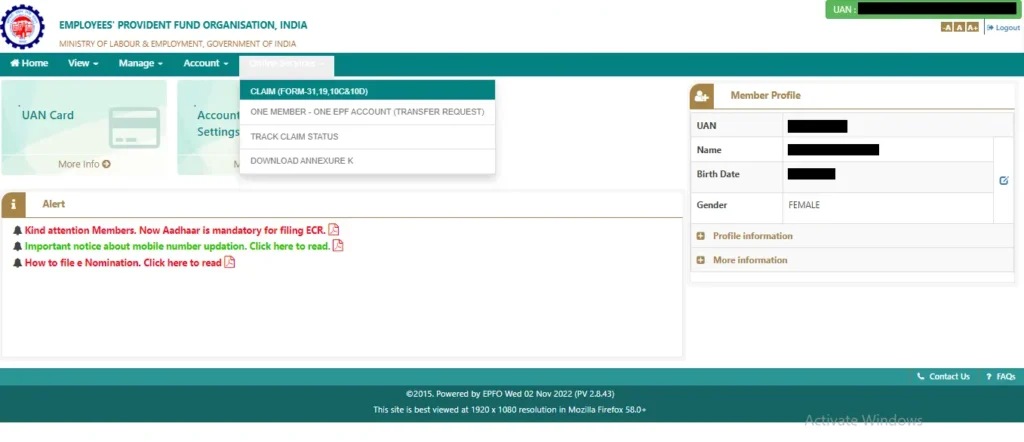
Withdrawing your Provident Fund (PF) online is a straightforward process if you follow the correct steps. Here’s a detailed, easy-to-understand guide on how to withdraw Provident Fund online, covering each step thoroughly, including basic salary calculation:
The first step in the process of how to withdraw Provident Fund online is accessing the official EPFO Member e-Sewa portal.
By starting here, you’ll gain access to all EPF-related services, including online withdrawals.
To proceed, you must log in to the portal using your credentials.
This step is crucial in the process of how to withdraw Provident Fund online, as it gives you access to your account.
💡 Tip: If you forget your password, click the “Forgot Password” option and follow the recovery instructions.
Before withdrawing your PF, ensure that your KYC (Know Your Customer) information is complete and accurate.
Verifying KYC details is a mandatory step in how to withdraw Provident Fund online, as incomplete or incorrect information can delay your claim.
💡 Why This Is Important: Proper KYC ensures hassle-free claim processing without delays.
Once your KYC details are verified, you can move on to the online services section to initiate your claim.
This section provides access to different claim forms required for PF withdrawal.
It’s crucial to confirm your bank account information before proceeding with the withdrawal claim.
Accurate bank details are essential when learning how to withdraw Provident Fund online to avoid issues with receiving your funds.
💡 Important Note: The bank account linked must match the name associated with your EPF account.
At this stage, you must specify the reason and type of withdrawal you are applying for.
This step is central to how to withdraw Provident Fund online, as it determines the nature of your claim.
💡 Tip: Choose the correct claim type to avoid delays or rejection.
After selecting the claim type, you need to provide additional details and complete the submission process.
💡 Note: Keep scanned copies of necessary documents ready before starting this step.
After submitting your claim, you can monitor its progress through the EPFO portal.
Tracking your claim ensures you stay informed throughout the process of how to withdraw Provident Fund online and can take timely action if needed.
💡 Reminder: The processing time for claims typically ranges from 5 to 20 working days.
By carefully following this step-by-step guide on how to withdraw Provident Fund online, you can complete the process smoothly and efficiently. Always ensure your KYC details are accurate and your claim type is correctly selected for a seamless experience while also exploring ways to Earn Extra Income for better financial security.

In a groundbreaking move to revolutionize provident fund access, the Government of India launched the EPFO 3.0 reform on June 1, 2025. This game-changing initiative introduces a seamless, digital-first approach that will transform how over 70 million EPF subscribers manage their funds. The core of this reform is the new ATM-based and UPI withdrawal facilities, designed to provide instant, hassle-free access to your savings—empowering employees with true financial freedom without the long waits or paperwork of the past.
| Situation | TDS / Tax Implications |
|---|
| Withdrawal before 5 years of service | Taxable. Entire amount is added to your income and taxed as per your slab rate. |
| Withdrawal before 5 years (Amount > ₹50,000) | TDS @ 10% if PAN is furnished. Without PAN, TDS @ 30% or maximum marginal rate. |
| Withdrawal before 5 years (Amount < ₹50,000) | No TDS deducted, but taxable as per your slab rate. |
| Withdrawal after 5 years of service | Completely tax-free, including employee contribution, employer share, and interest earned. |
| Withdrawal for specific reasons (Form 31) | No TDS and generally non-taxable, even before 5 years (e.g., medical emergencies, marriage, home purchase under EPFO rules). |
While the process of withdrawing your Provident Fund online is straightforward, you may face some challenges along the way. Below is a detailed list of common issues and practical solutions to help you overcome them smoothly.
A frequent issue is finding that your KYC (Know Your Customer) details are not verified when attempting to withdraw funds. This problem arises when your Aadhaar card, PAN, or bank account information is missing or has not been authenticated by EPFO.
Ensuring that your KYC details are verified is essential for completing the process of how to withdraw Provident Fund online successfully.
Another common problem is the rejection of your PF claim due to inaccuracies in the provided bank account details or uploaded documents.
Being meticulous with your details can prevent errors while navigating the process of how to withdraw Provident Fund online.
Sometimes, even after submitting a claim correctly, there may be delays in processing due to administrative backlogs or technical glitches.
Proactively monitoring your claim status helps ensure a smooth experience while learning how to withdraw Provident Fund online.
You may encounter issues such as pages not loading or functions not working correctly due to high traffic or browser problems.
These steps can help you avoid frustration while following the steps for how to withdraw Provident Fund online.
By understanding these common issues and their solutions, you can navigate the PF withdrawal process with confidence and efficiency.
When learning How To Withdraw Provident Fund Online, follow these tips to avoid common pitfalls:
By following these tips, you can ensure a hassle-free experience when learning How To Withdraw Provident Fund Online. If you have any further questions or need help, feel free to reach out!
Read More:
In conclusion, learning how to withdraw provident fund online is essential for quick and hassle-free access to your savings. By using your UAN login on the official EPFO portal, you can easily complete the PF withdrawal process from anywhere. Whether you want to know how to withdraw PF online with UAN or how to withdraw full PF amount online after leaving job, the EPFO’s digital services simplify every step. Don’t delay take action now to securely withdraw your PF and manage your funds efficiently with the trusted EPFO system.
Start your PF withdrawal process today and access your funds without any hassle.
To withdraw your PF amount online, log in to the EPFO portal with your UAN and password. Go to the “Online Services” tab, select “Claim (Form-31, 19, 10C & 10D),” enter your bank account details, and submit your claim.
Yes, you can withdraw 100% of your PF amount under specific circumstances, such as retirement, unemployment for more than two months, or leaving India permanently.
Yes, EPF withdrawal can be done online through the EPFO portal. Ensure your KYC details are updated and linked to your UAN for a smooth process.
To withdraw PF online with your UAN, visit the EPFO portal, log in with your UAN and password, navigate to “Online Services,” and select “Claim (Form-31, 19, 10C & 10D).” Fill in the necessary details and submit your claim.
After leaving your job, you can withdraw the full PF amount by logging in to the EPFO portal with your UAN, selecting “Claim (Form-31, 19, 10C & 10D)” under “Online Services,” entering your bank details, and submitting your claim.
Withdrawing your provident fund online without a UAN is not possible. You need to have your UAN activated and linked with your KYC details to withdraw your PF online.
For online PF withdrawal, you need to submit some documents to the EPFO. These include your Aadhaar, PAN card, bank details, and a canceled cheque.
You may also need to provide a copy of your UAN card and the online claim form. However, the information must match the details on your EPF account.
The online PF withdrawal process usually takes 5-15 days to complete. The actual time it takes may vary depending on factors. These include the accuracy of the information and the verification process. It also includes the workload of the EPFO. You can track the status of your PF withdrawal online using your UAN and other details. If there are any discrepancies, it may take longer to process.
Yes, a Provident Fund (PF) can be withdrawn online through the EPFO portal using your UAN login. Once your KYC details like Aadhaar, PAN, and bank account are verified, you can easily apply for partial or full PF withdrawal without visiting the office. The process is simple, paperless, and ensures faster claim settlement.
Yes, withdrawals before 5 years of service are taxable. TDS is deducted if the amount exceeds ₹50,000. Withdrawals after 5 years are tax-free.
You can withdraw up to 75% of your PF balance if you apply within one year before retirement, subject to EPFO rules. Partial withdrawals may also be allowed for specific reasons like emergencies.
Recommended Read :


