

When applying, it can be not very clear to decide the best approach for your job application email. Should you include your documents as attachments, or is it better to paste the text directly into the email? Many people spend significant time and effort crafting their resumes to make a strong impression when planning how to send resume to HR. A well-crafted sample email to send resume for job can make a huge difference in getting noticed by recruiters.
In today’s digital age, knowing how to send resume to HR effectively is vital for job seekers. Many applicants often overlook the importance of a well-structured email when they send resume to HR.
Additionally, remember that how you send resume to HR can influence your chances of success. The right approach can significantly enhance your visibility to potential employers.
Moreover, when you send resume to HR, it is essential to follow up politely and professionally to reinforce your interest in the position.
Therefore, as you prepare to send resume to HR, ensure that your email reflects your professionalism and enthusiasm.
On average, recruiters spend about 6–8 seconds reviewing your resume. Therefore, when applying for a job online, the email to which you attach your CV is as crucial as the document itself. You must ensure your email is concise, visually appealing, and effectively communicates your intentions, which is the core of knowing how to mail resume to HR.
Before you send resume to HR, remember to proofread your email carefully to avoid any mistakes that could undermine your application.
When you send resume to HR, a polite and courteous tone should always be maintained to leave a positive impression.
Ultimately, knowing how to send resume to HR can set you apart from other candidates and improve your chances of getting hired.
To send resume to HR, draft a professional email with a clear and relevant subject line, a key part of understanding how to send cv by email subject (e.g., “Application for [Job Title] – [Your Name]”). Start with a brief introduction about yourself and your interest in the position. Attach your resume, preferably in PDF format, and double-check that the email is well-structured and free of grammatical errors before sending. This process is essential for anyone learning how to send resume in email.
Now, let’s dive into the steps for crafting the perfect email for job application to send your resume to HR.
When you send resume to HR, ensure that your cover letter is also tailored to the position you are applying for.
In conclusion, always focus on how to send resume to HR correctly to make a great first impression.
Before you send resume to HR, make sure your email is engaging and prompts the reader to consider your application seriously.
What should I include in the email when sending a resume to HR? You may be thinking about it. Submitting a resume to HR on your own initiative is more effective than sending it through an anonymous online form. It increases your chances of being shortlisted for the job interview stage and forges a personal connection between you and the recruiter. We show you how to do that in this article on emailing a resume.
When you send resume to HR, always include a brief message that summarises your qualifications and interest in the role.
So, here is complete guidance on how to send resume to HR to seek employment, including preparing and editing plain text resumes as well as attaching PDF files in your professional email.
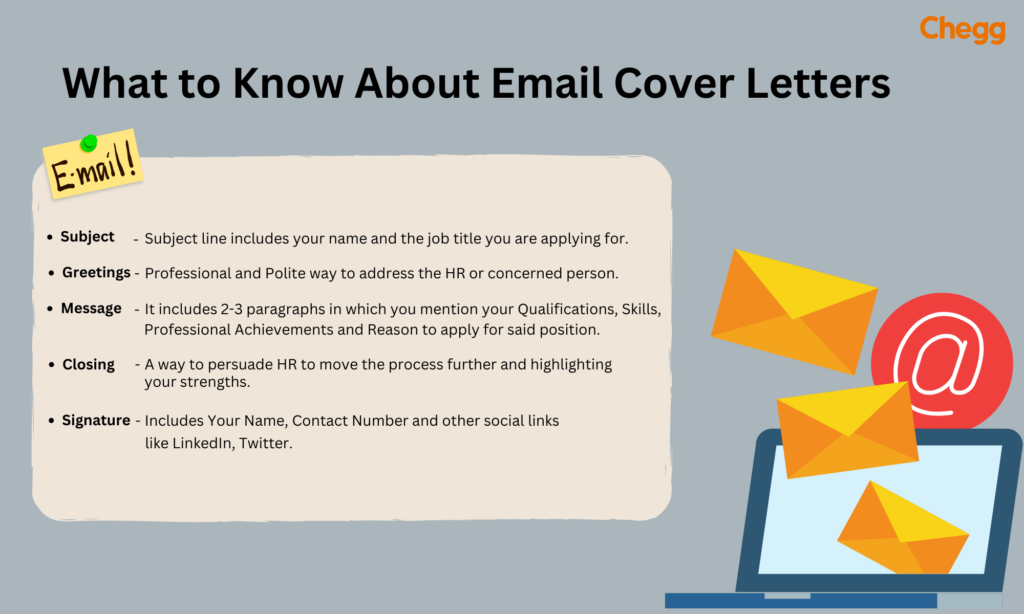
When applying for a job, knowing how to send resume to hr in mail is crucial. Start with a professional email subject line. Address the HR manager respectfully and write a brief, polite introduction mentioning the job role you’re applying for. Clearly state your interest and highlight key skills relevant to the position. Attach your resume in PDF format and ensure the file is named professionally.
Before hitting send, double-check for any typos or errors. A concise and well-structured email shows professionalism. Mastering how to send resume to hr in mail can make a positive first impression and increase your chances of getting noticed.
Following a clear email format on how to send resume in mail to hr helps your chances of getting the job, so let’s take a closer look at the essential aspects of your cv mail to hr:
1. Use a Professional Email Address
Before you send resume to hr, make sure you have a professional email address. About 70% of resumes are rejected due to unprofessional email addresses. Research shows that a formal email ID can increase your chances of being shortlisted. Hiring managers usually notice the email ID the email is coming from. An email address like “cooldude@xyz.com” is considered unprofessional and can be a pitfall in your selection process.
Make sure to use a professional email ID with your full name. You can also use your initials in the email address.
Example: “robertm@gmail.com” or “aksharma@gmail.com“
2. Create a Compelling Subject Line
It will be the first thing they see. Yes, the subject line is a very small portion of the entire email. But the recruiter will notice it right away as well. You should be extremely precise with how to send cv by email subject when you send resume to HR.
First, look over the job description for any submission guidelines. The company could have a preferred style. If such is the case, you must adhere to it. You should indicate in the subject line if someone has referred you for the position. If you’d like, you can add your position or credentials, but keep the subject line accomplishment in mind.
3. Body of an Email
When you send mail to hr for job with resume, a formal introduction is crucial. Introduce yourself formally and use the hiring manager’s name. Make it professional and clean. You should introduce yourself, explain why you are writing this email (a key part of what to write in an email when sending a resume), and describe what is within the first brief paragraph.
Provide an impactful introduction of your greatest accomplishments in the next section. Naturally, only highlight accomplishments that are related to the position. Finish this sentence by outlining the value you would provide to the organization and the talents you would employ to achieve this. You may include a compelling call to action, but take care to avoid sounding unpleasant or overly eager.
Write yours genuinely or faithfully. Finally, a formal signature is required! Don’t forget to provide your contact information when you send your resume to HR.
Example:
You can use free tools like Grammarly to remove grammatical and spelling mistakes. Double-check all the essential information, like your name, company name, the position you are applying for, etc.

Knowing the proper email for job application can make a big difference if you’re unsure about how to write mail to hr for job with resume. Make sure your subject line is clear first. Introduce yourself briefly and start your email with a kind greeting. Explain why you’re a good fit for the position you’re applying for. For convenience, attach your resume in a PDF file with a business-oriented file name.
Keep your email brief and businesslike when sending your resume to HR. To prevent mistakes, proofread thoroughly. You can increase your chances of getting the job you want by using the appropriate format and tone.
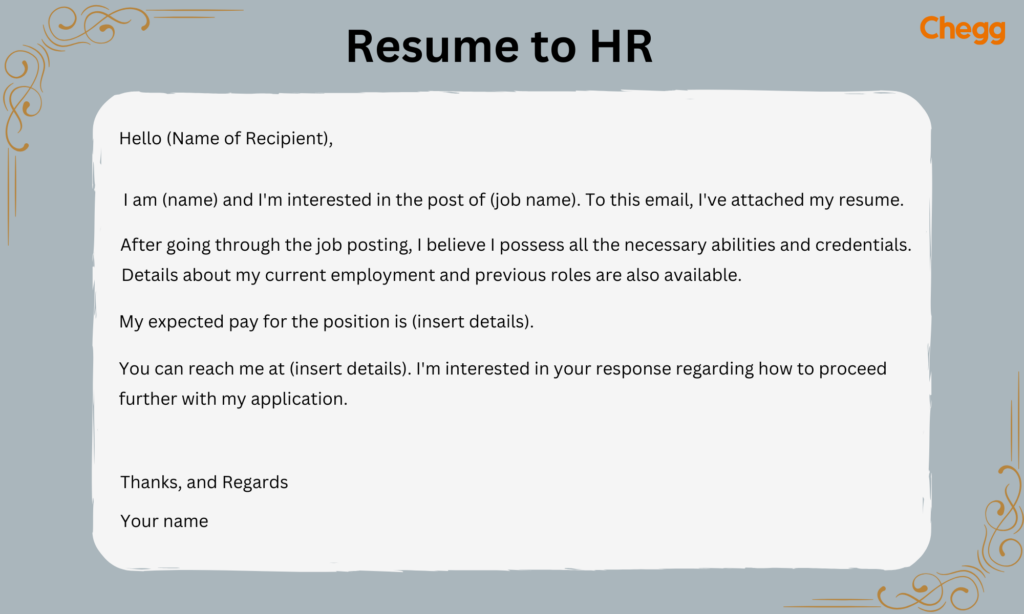
Here are some sample email to send resume for job formats that can help you when you send resume to HR in getting a job –
Hello (Name of Recipient),
I am (name) and I’m interested in the post of (job name). To this email, I’ve attached my resume.
After going through the job posting, I believe I possess all the necessary abilities and credentials. Details about my current employment and previous roles are also available.
My expected pay for the position is (insert details).
You can reach me at (insert details). I’m interested in your response regarding how to proceed further with my application.
Thanks, and Regards
Your name
Dear Sir/ Ma’am,
I am interested in applying for the job position of Project Manager at ABC company.
I am confident that I will be a strong fit for this position. As of now, I possess 6 years of experience in software development projects and experience in embedded and application software development, along with 3 years of project management experience.
In my past experiences, I have managed complex projects on time and within budget. I would appreciate it if given a chance to prove my value addition for this job role. Please find my attached resume and cover letter.
Thank you so much for your time. I look forward to hearing from you about the next steps.
Sincerely,
(Your name)
Dear Hiring Manager,
As a [mention your major achievement], with a proven record of [experience], I aim to leverage my skills and knowledge to help ABC company succeed.
I look forward to meeting you in person to share my insights on [how you’re going to help the prospective employer with their goals] and discuss the various prospects of the role.
Please let me know if any additional information is required. You can check my portfolio and sample article here (attach the link).
Please find attached my resume and a cover letter for your reference.
Sincerely,
(Your email signature)
Overall, the way you send resume to HR can play a significant role in your job application success.
Subject: Application for Marketing
Dear Hiring Manager,
I would like to apply for the role of marketing assistant. Please find my CV and cover letter in the email attachment.
I have overseen the development of marketing strategies for several firms for the last five years and carried out marketing strategies on my own and given clients marketing guidance.
I value the time you spent reading through my cover letter and CV. Looking forward to your response.
Sincerely,
(Your name)
Subject: Application for Content Writer
Dear Mr. Shikhawat,
My name is Tina and I have done my graduation from IP University. I have recently worked for an exciting company named ABC. I am enthusiastic to use the abilities and knowledge I have gained from my internship to support this wonderful company.
My resume and portfolio have been attached here for reference.
I appreciate you looking over my application. I look forward to learning about any actions or processes.
Sincerely,
(Your name)
Subject: Application for [Job Title] – Resume Submission
Dear [Recipient’s Name],
I hope this email finds you well. I am writing to express my interest in attending the upcoming job fair and submitting my resume for consideration. Please find my resume attached for your review.
I am excited about the opportunity to explore potential roles at [Company Name] and would love to contribute my skills and experience to your team. Please let me know if you require any additional information.
Thank you for your time and consideration.
Sincerely,
(Your name)
Subject: Networking Opportunity – Resume Submission
Dear [Recipient’s Name],
I hope you’re doing well. I’m reaching out to introduce myself and express my interest in exploring potential opportunities at [Company Name]. I’ve attached my resume for your reference.
With my experience in [briefly mention your skills or field], I am eager to connect and explore how I can contribute to your team. If you have any opportunities available or could provide guidance on the recruitment process, I would greatly appreciate it.
Thank you for your time, and I look forward to hearing from you.
Sincerely,
(Your name)
With the right techniques, you can efficiently send resume to HR and increase your chances of getting hired.
Applying for a Job:
Subject: Application for Position – [Your Name]
Dear [Recipient Name],
I am writing to apply for the position of [Job Title] at [Company Name] posted on [Website Location]. I have attached my Resume for your review.
I believe my unique qualification can help your organization, and I look forward to discussing my qualifications and how I may be able to contribute to your business.
Best Regards,
[Your First Name Last Name]
[Your Contact Number]
Following Up on an Application:
To optimise your chances, remember that how you send resume to HR can influence the impression you create.
Being precise about how to send resume to HR can greatly enhance your chances of moving forward in the hiring process.
Always remember that you should know how to send resume to HR before applying, as this will help you stand out in the crowd.
Subject: Follow-Up on [Job Title] Application – [Your Name]
Hello [Hiring Manager’s Name],
I hope you are doing well! I’m following up on my application for the [Job Title] position submitted on [Date]. I am very excited about the possibility of working with [Company Name] and would appreciate any updates you may have on my application.
Thank you for your time and consideration.
Sincerely,
[Your Name]
[Your Contact Information]
In short, knowing how to send resume to HR can improve your visibility and increase your interview opportunities.
Requesting a Referral:
Subject: Request for Referral – [Job Title] at [Company Name]
Dear [Recipient’s Name],
I hope you are doing well. I wanted to reach out and see if you’d be willing to refer me for the [Job Title] position at [Company Name], I’m including a copy of my resume as well.
Any help would be appreciated.
Best,
[Your Name]
[Your Contact Information]
Finally, having a clear understanding of how to send resume to HR is vital for any job seeker.
Remember that every time you send resume to HR, you have a chance to make a lasting first impression.
Take the time to ensure that you know how to send resume to HR effectively, as it will greatly enhance your prospects.
Understanding how to send resume to HR effectively can be the key to securing a job interview.
|
Do’s |
Don’ts |
|
Add a digital signature at the end of your email. |
Do not send resume to HR directly without writing an email. |
|
Use a professional email address. |
Don’t send emails without proofreading. |
|
Highlight your skills and experience. |
Don’t name your attachment (resume) as Resume 1 or Resume 2 |
|
Keep your email to the point. |
Avoid using emojis and creative fonts. |
|
Write a brief and informative subject line. |
Avoid sending follow-up questions repeatedly. |
In summary, knowing how to send resume to HR is essential for achieving success in your job application process.
Whenever you send resume to HR, keep in mind that clarity and professionalism are key to making a strong impression.
Each time you send resume to HR, take the opportunity to showcase your strengths and qualifications.
To succeed, be mindful of how you send resume to HR and tailor your message to resonate with the hiring team.
Thus, pay close attention to how to send resume to HR to ensure your email stands out.
It’s crucial to carefully follow the guidelines in the job posting when preparing your job application email. Verify that your resume follows the guidelines, see if you need to include a cover letter, and check if you need to use a particular subject line (a key part of how to send cv by email subject) or job reference number. Your resume has a better chance of being reviewed if you pay attention to these details before you send resume to HR.
Use these best practices if no explicit instructions are provided for your email for job application:
Ultimately, it is crucial to understand how to send resume to HR as it can significantly impact your job search journey.
By mastering how to send resume to HR, you place yourself in a stronger position to secure the job you desire.
Knowing how to send resume to HR is important for making a good impression. A well-written and structured job application email, showcasing your skills and experience, increases your chances of being shortlisted for an interview. A well-crafted sample email to send resume for job can set you apart from other applicants, make yours stand out!
When you send a resume to HR via email, it requires proper formatting. The best course of action is to submit your resume in any format recruiters request. Adhere to standard business letter formatting guidelines when you send resume to HR through the mail.
Do not forget to add your contact details so that they can revert once the company makes a decision. While not as extensive as a cover letter, the email you send to HR with your application form should showcase your qualities and abilities and include an attachment of your professionally written resume. It will increase your chances of getting shortlisted for the interview.
When sending your resume by email, format it as professionally as you can, including the email address, the subject line, the signature, and also your contact details. Learn the proper way of how to send resume in email and increase your chances of landing an interview. Master how to send CV by email subject with these proven strategies and increase your chances of getting hired!
Sending a resume to HR is much more than simply uploading a file and pressing send; it is about establishing a positive first impression. By knowing the proper format for how to mail resume to hr, utilizing an effective subject line, and personalizing your approach to suit different situations, you are greatly increasing your chances of standing out. Each circumstance, whether it be applying for a new position, making a follow-up email, or requesting a referral, should show professionalism and purpose.
Utilize the tips, templates, and tools outlined in this guide to help ease the process of how to send mail to hr for job with resume, and help yourself get one step closer to your dream job.
Read more:
10+ Expert Resume Tips to Help You Land a Job in 2025
Cover Letter for Fresher 2025 Free Templates & Writing Tips
Resume Format for Freshers: A Complete Guide with Templates & Samples
Difference Between CV and Resume – Your Essential Guide in 2025
Subject for Sending Resume: Why It’s Crucial for Job Applications
Best Email Format Sample: Expert-Approved Templates for 2025
When you send resume to HR, make sure you follow all the guidelines given by the hiring manager. Keep emails short and simple. It should not be long and contain only relevant information. You can mention your name and the job position you are applying for. Briefly mention your experience and skills and your interest in joining the company.
To send a resume to HR, make sure to add a proper email, addressing the recruiter or hiring manager. Do not send a resume to HR without a professional email. Make sure your email highlights your skills, experience, and interest in joining the company.
I am sending my CV for your consideration.
Subject: Application for [Job Title] Position
Dear [HR Manager’s Name],
I hope this email finds you well. I am writing to express my interest in the [Job Title] position at [Company Name], as advertised on [where you found the job listing]. Please find attached my CV for your consideration.
I believe my skills and experiences align well with the requirements of the role, and I am eager to contribute to your team.
Thank you for considering my application. I look forward to the opportunity to discuss my suitability for the position further.
Best regards,
[Your Name]
[Your Phone Number]
[Your LinkedIn Profile or Website] (if applicable)
You can use a clear subject line like ‘Application for [Job Title],’ address HR politely, briefly state your purpose, attach required documents such as your resume, and conclude with a professional closing statement.
1. Open WhatsApp and find the HR contact.
2. Tap on the chat to open the conversation.
3. Click on the attachment icon (paperclip).
4. Select Document to attach your resume.
5. Browse and select your resume file.
6. Add a brief message, such as Dear [HR Name], please find my resume attached for your consideration.
7. Press send.
Subject: Application for [Job Title] – [Your Name]
– Your full name
– Phone number
– Email address
– LinkedIn profile (if applicable)
– Professional title or desired position
– Location (optional)
– Website or portfolio link (if applicable)
– A brief professional tagline or quote (optional)
Use a format like firstname.lastname@example.com or firstinitiallastname@example.com. For example, john.smith@email.com or jsmith@email.com.