Your PF (Provident Fund) number is a unique identifier for tracking EPF contributions and managing retirement savings in India, linked to your UAN for easy access.
PF numbers can be found via salary slips, UAN portal, EPF passbook, mobile app, SMS alerts, or employer HR, ensuring seamless balance checks, transfers, and claims.
Keeping your PF details updated is crucial for withdrawals, transfers, KYC compliance, and preventing errors or fund mismanagement in 2025.
Table of Contents
Suppose you’re wondering how to find your PF number in the UAN portal. In that case, it’s important to understand that the Employees’ Provident Fund Organization (EPFO) assigns every employee with an EPF account a unique identifier. This number becomes especially useful if you’ve changed jobs multiple times or lost track of your employment records.
A Provident Fund (PF) account is quite common for most salaried employees in India. Your PF number is not just a formality—it’s a key part of managing your retirement savings. Whether checking your balance, verifying past contributions, or completing official documentation, knowing how to find PF number in UAN portal can save you time and confusion.
In this guide, we’ll walk you through the simple steps to find your PF number in the UAN portal, ensuring you can access your information anytime. Whether you’re logging in to retrieve your number online or looking for help after forgetting it, we’ve got you covered. With just a few clicks, you can locate your PF number and keep your Provident Fund account running smoothly.
What is the PF Number?
Before we discuss how to find PF number online, let’s briefly discuss what it is. A Provident Fund (PF) number is unique to every employee working under India’s Employees’ Provident Fund Organization (EPFO). The number helps track the contributions made by the employee and employer to the Provident Fund, a retirement savings scheme.
PF Account Number Format
The PF (Provident Fund) Account Number follows a specific format, which typically looks like this:
XX/XXX/XXXXXXX
Here’s a breakdown of the format:
First two digits (XX): These represent the regional office code of the Employees’ Provident Fund Organization (EPFO) that is handling your account. For example, “DL” stands for Delhi, “MH” for Maharashtra, etc.
The next three digits (XXX): These represent the establishment code. It identifies the specific company or organization to which the employee is registered.
Last seven digits (XXXXXXX): These represent the employee’s unique ID number within the company or establishment.
So, a full PF account number might look something like DL/12345/6789012, where:
DL = Region (Delhi)
12345 = Establishment code
6789012 = Employee ID under the establishment
Note: The exact format may vary slightly depending on the region and the company’s registration, but this is the general structure followed by EPFO offices.
Importance of EPF Account Number
The EPF (Employees’ Provident Fund) account number is a crucial identifier for salaried employees in India. It allows individuals to track their retirement savings, check contributions made by both the employee and employer, and access important services such as withdrawals, transfers, and balance checks. Without this number, managing or claiming your provident fund becomes difficult and time-consuming. The EPF account number ensures transparency, helps avoid fund mismanagement, and is essential during job changes, as it links your employment history with your PF contributions.
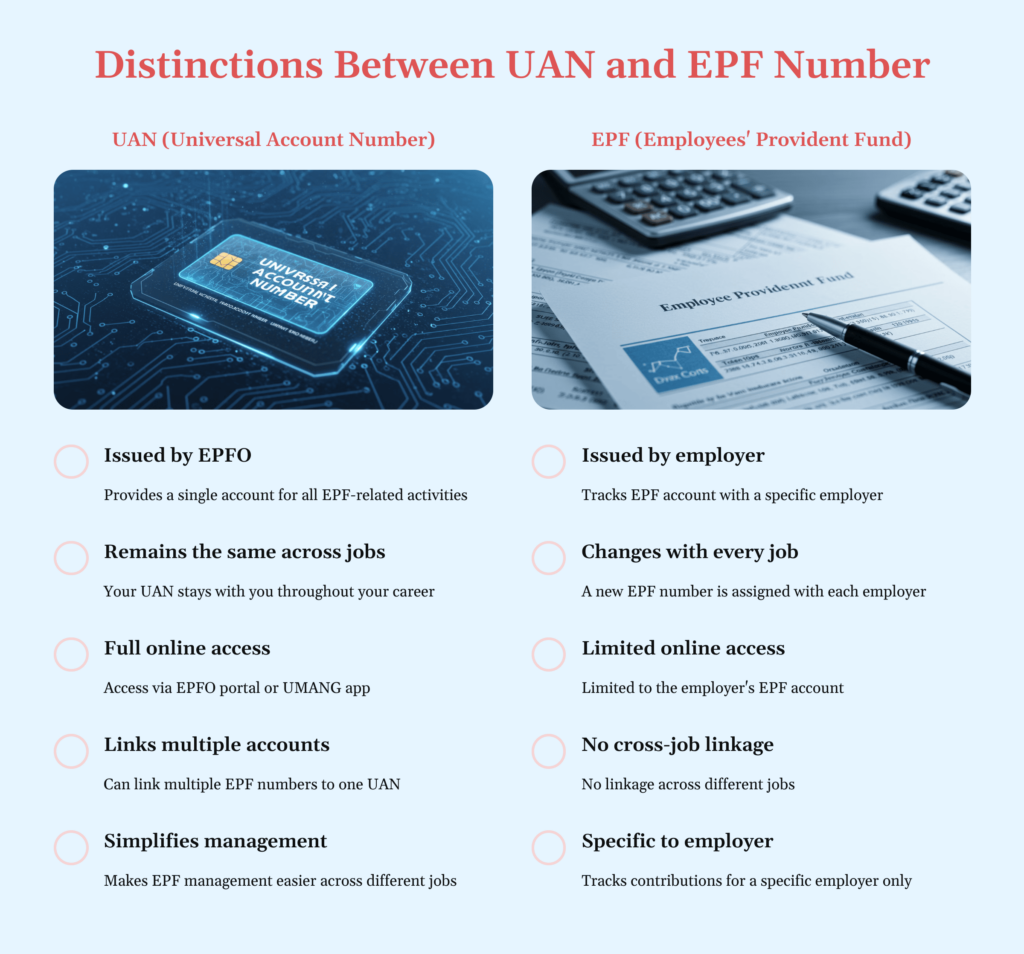
Key Distinctions Between UAN and EPF Number
The UAN (Universal Account Number) and EPF (Employees’ Provident Fund) Number are essential identifiers in the Indian retirement savings system. While both are connected to your provident fund, they serve distinct purposes. Understanding these differences is also important when learning how to find PF number online or how to find PF number from UAN.
1. Definition
UAN (Universal Account Number)
A 12-digit number is issued by the Employees’ Provident Fund Organization (EPFO) to every registered employee.
It stays constant throughout your career, even as you switch employers.
Knowing your UAN is often the first step in understanding how to find PF number in UAN portal, especially when accessing multiple PF accounts.
EPF Number
A unique number is assigned by the employer’s EPF department.
Each EPF number is tied to one specific employer, making it necessary to know how to find PF number when changing jobs.
2. Purpose
UAN
Acts as a centralized account for all your EPF numbers.
Makes it easy to access and manage PF contributions across multiple jobs.
It plays a key role in enabling employees to view and manage their EPF details online, a vital aspect of how to find PF number online.
EPF Number
Explicitly used to track your PF contributions with a given employer.
Changes occur with every new job, so many employees look up how to find PF number from the UAN when consolidating old accounts.
3. Issuance
UAN
Issued by the EPFO directly after KYC verification.
It acts as a permanent reference number for all your EPF activity.
EPF Number
Issued by the employer through the company’s EPF setup.
It is not permanent and changes with every employer, which makes knowing how to find PF number after job changes quite important.
4. Change Over Time
UAN
Remains unchanged regardless of employment changes.
Helps simplify the transfer of balances between old and new PF accounts.
EPF Number
Changes with each employer.
If you’ve worked in multiple organizations, understanding how to find PF number from UAN will help you track all previous contributions.
5. Online Access
UAN
Provides full online access via the EPFO portal and the UMANG app.
Through this, employees can:
Check balances
Update KYC
Transfer PF
View past contributions
This also answers the common query: how to find PF number in UAN portal.
EPF Number
Offers limited online access.
You may need it for specific employer-related queries, but it won’t give you a consolidated view like the UAN.
6. Usage for EPF Transfer
UAN
Enables seamless PF transfer between employers.
All your EPF numbers from various jobs can be linked under one UAN.
This is why it’s important to know how to find my PF number online and track them all under your UAN.
EPF Number
Becomes inactive when you switch jobs.
Unless you’ve linked it under your UAN, the old account must be transferred manually.
How to Find PF Number Easily: A Step-by-Step Guide
To find your PF (Provident Fund) number, you can start by checking your salary slip, as most employers include the PF number there. Alternatively, you can log in to the UAN Member Portal using your Universal Account Number (UAN) and password. Once logged in, navigate to the “Service History” section under the “View” tab to see all your linked PF account details.
If you’re wondering how to find PF number from UAN portal, this is one of the most straightforward methods. Simply accessing the UAN Member Portal provides a complete view of all PF accounts associated with your UAN. If you cannot locate your PF number, contact your employer’s HR department or the EPFO customer care helpline at 14470 for assistance. This number is unique for every employee and helps track contributions to the Employee Provident Fund. Here’s a step-by-step guide on how to find PF number from UAN through various methods:
Step 1: Check Your Pay Slip
Look for PF Details:
Your PF number may be listed under “Deductions” or “Employee Benefits”.
Locate the PF Number:
It may be labeled as “PF Number”, “EPF Number”, or “UAN Number”.
Step 2: Check Your UAN (Universal Account Number)
Link Between UAN and PF Number:
If activated, your UAN is directly linked to your PF number.
To Find Your PF Number:
Log in to the EPFO Member Portal using your UAN and password.
Your linked PF number will be visible.
This is a direct answer to how to find PF number from UAN portal.
Step 3: Access Your EPF Passbook
View Passbook:
Another way to explore how to find my PF number online.
Steps to Access Passbook:
Log in to the EPFO Member Portal with your UAN and password.
Navigate to the “View Passbook” section.
Your PF number and balance will be displayed.
Step 4: Check for Email or SMS Notifications
SMS Alerts:
If your mobile is registered with EPFO, SMS alerts may include your PF number.
Email Notifications:
EPFO sometimes sends emails that may also contain your PF number.
Step 5: Ask Your Employer’s HR Department
If you’re still unsure how to find PF account number:
Reach out to your HR or Payroll Department.
They can provide the details directly.
Step 6: Use the EPFO Mobile App
EPFO Mobile App:
Available on Google Play Store and Apple App Store.
Steps to Use the App:
Log in using your UAN and password.
Your PF number and other account details will be shown.
Step 7: Visit the UAN Member Portal
UAN Member Portal:
Accessible if your UAN is activated.
Steps to Check PF Number:
Log in using your UAN and password.
Your PF number linked to the UAN will appear.
This is another helpful method if you’re looking for how to find PF number from UAN portal.
Step 8: Use the “Find Your PF Number” Feature
If you’re trying to figure out how to find PF account number using the PAN card:
Use EPFO’s online services.
You can search using your PAN, Aadhaar, or other details (if they’re linked).
How to Find PF Number in UAN Portal?
To find your PF Number (Provident Fund Number) online, you can follow these steps in India:
1. Using the EPFO Member Portal
Visit the EPFO Member Portal.
Log in with your UAN (Universal Account Number) and password.
Once logged in, navigate to the “View” section and click on “Profile”.
Here, you will see your EPF number listed under the “Member ID” section.
2. Using the EPFO UAN Portal
Go to the EPFO UAN Portal.
Log in with your UAN and password (if UAN is activated).
After logging in, go to “View” and then “KYC” or “Profile” to find your EPF Number.
3. Via SMS (if UAN is Registered)
You can also send an SMS to 7738299899 from your registered mobile number with the message: EPFOHO UAN ENG (where “ENG” is the language code, such as “ENG” for English).
You will receive a message with your UAN and EPF number.
4. Using the EPFO Mobile App
Download and install the EPFO mobile app from the Google Play Store or Apple App Store.
Register using your UAN and access your EPF details, including the PF number.
5. Through the Employer
You can also ask your employer’s HR or payroll department for your EPF Number.
By using these methods, you should be able to locate your PF Number and manage your EPF account efficiently.
Documents Required for PF Number
Certain documents and information are required to obtain or find your PF number, depending on whether you are registering for a new PF account or accessing an existing one. Here are the documents typically required:
1. For New PF Registration (if you are an employee joining a new organization)
If you’re joining a new organization and your employer is registering you for a Provident Fund (PF) account, you will need the following documents:
Aadhar Card: Your Aadhar card is essential as it links your PF account for KYC (Know Your Customer) compliance.
PAN Card: This is also required for tax purposes and to link your PF account.
Passport-size Photograph: Typically, one or two passport-sized photographs are required.
Bank Account Details: Bank account number and IFSC code for crediting the employer’s contribution to your PF account.
Employment Details: Information about your current employer, including the company name and PF registration number.
2. For Existing PF Account (to find or retrieve your PF number)
If you are looking to retrieve your PF number, the following documents might be needed:
Aadhar Card: You must ensure that your Aadhar card is linked with your UAN (Universal Account Number) for easy access to your PF details.
UAN Number: If available, you will need your UAN to access or retrieve your PF details online through the EPFO portal.
PAN Card (if available): Sometimes, it may be needed for verification.
Bank Account Details (optional): Having bank details may be necessary if you file a claim or request a transfer.
3. Documents to Verify PF Details (if you want to check or claim your PF)
If you’re trying to check or withdraw your PF, the following documents might be required:
UAN Number: This is the most crucial document for accessing your PF details.
Aadhar Card: Used for linking and verifying your identity.
Bank Account Details: To transfer the PF balance or receive a refund.
Employment Details/Last Employment Certificate: If necessary, for claims or to confirm your previous employer’s contribution.
Passport-sized Photograph: If submitting a claim form.
Note:
Keep all your documents handy while accessing or updating your PF account.
You can also link your Aadhaar number with yourUAN through the EPFO portal to manage your PF details better.
If you have any questions or need assistance retrieving or managing your PF account, you should always contact your employer or visit the official EPFO website.
Importance of Knowing Your PF Account Number
Knowing your PF (Provident Fund) account number is important for several reasons, as it helps in managing and accessing your Employees’ Provident Fund (EPF) savings effectively. Here are some of the key reasons why it’s important to know your PF account number:
1. Tracking Your Contributions:
Your PF account number allows you to track the contributions you and your employer make to your EPF account. This ensures that your EPF account is being funded regularly, and you can monitor the growth of your savings over time.
2. Checking Balance and Withdrawal:
You must know your PF account number to check your EPF balance or withdraw. The EPFO allows employees to check their EPF balance online via the EPFO portal or through the UMANG app using their PF account number.
Knowing your PF account number enables you to make quick and easy withdrawals when necessary, such as for retirement, medical emergencies, or other financial needs.
3. Transferring Your EPF Balance:
If you change employers, knowing your PF account number allows you to transfer your EPF balance from your old account to your new account. The transfer process is usually done through the UAN (Universal Account Number), but you will need your PF account numbers from both the old and new employers to ensure a smooth transfer.
4. Linking to UAN:
Your PF account number is linked to your UAN (Universal Account Number), crucial for managing your EPF account across multiple employers. Knowing your PF number helps ensure that all your accounts are correctly linked to your UAN for easy access and management.
5. Claiming EPF Benefits:
When you retire or leave your job, you can claim your EPF benefits, including accumulated contributions and interest. Your PF account number is necessary for filing a claim to withdraw the funds or transfer them to your new EPF account.
6. Ensuring Correct Employer Contributions:
Knowing your PF account number is essential to verify that your employer contributes the correct amount to your EPF account every month. You can raise the issue with the EPFO and ensure your savings are intact if there are discrepancies.
7. Maintaining KYC for EPF:
Knowing your PF account number helps with the KYC (Know Your Customer) process. EPFO requires employees to submit documents such as Aadhaar, PAN, and bank details for KYC. Proper KYC ensures easy access to online services like checking balances, withdrawing, and transferring EPF funds.
8. Accessing EPF Services:
Many services the EPFO offers, such as online transfers, withdrawals, and balance checks, require knowledge of your PF account number. Without it, you might be unable to access these services or get information about your EPF account.
9. Preventing Misplacement of Contributions:
If you have multiple EPF accounts (due to changing jobs), knowing your PF account number helps you identify and manage each account, preventing any funds from getting lost or overlooked. It also ensures that all accounts are correctly linked and tracked under your UAN.
10. Avoiding Fraud or Errors:
Regularly checking your PF account number and contributions can detect any discrepancies or fraudulent activities early. Knowing your PF account number ensures that your contributions are correctly credited and helps you take necessary action if there are any errors.
What is the EPFO Customer Care Number?
The primary customer care number for the Employees’ Provident Fund Organization (EPFO) is 1800 118 005. This toll-free helpline operates around the clock and allows employees to seek assistance regarding their PF accounts, Universal Account Number (UAN), and other inquiries.
Here are some essential points about the EPFO customer care number:
Toll-free contact: 1800 118 005.
Accessible 24/7.
Useful for PF accounts, UAN, claims, and additional services inquiries.
EPFO also offers a multilingual toll-free helpline at 14470, available from 7 AM to 9 PM.
Employees can send their questions via email to the EPFO helpdesk at employeefeedback@epfindia.gov.in
EPFO services can also be accessed through the UMANG mobile app, with a missed call to 9718397183 for assistance.
Conclusion
Finding your PF number is now easier than ever, thanks to online tools and government portals like the EPFO website and UMANG app. Whether you’re a new employee or switching jobs, knowing how to find your PF number ensures you stay in control of your retirement savings. By following the simple steps mentioned above, you can quickly access your PF details without any hassle. Always keep your UAN, employment records, and mobile number updated to avoid delays. Stay informed, stay secure—track your PF number with ease in 2025.
To know your PF number online, visit the EPFO portal. Log in using your UAN, and check the “Member ID” section for your PF number. Alternatively, you can use the EPFO mobile app or SMS service by sending your UAN to 7738299899.
How to check PF number without UAN number?
You can check your PF balance by giving a missed call to 9966044425 from your registered mobile number. After making a missed call, you will receive an SMS with your PF details.
How to find a PF number using a PAN card?
To find your PF number using your PAN card, follow these steps: 1. Visit the EPFO Portal. 2. Go to the “Know Your EPF Account Number” section. 3. Enter your PAN card number and other required details like your name, date of birth, and mobile number. 4. You will receive your PF number linked to your PAN card. 5. Alternatively, contact your employer’s HR department for assistance.
How do I check my EPF number?
To find your Employee Provident Fund (EPF) number, you can check your salary slip, contact your HR department, use the EPFO UAN portal, or visit the nearest EPFO office. Alternatively, you can also use the UMANG app.
How can I claim my PF number?
You need your PF number to claim your PF amount. Visit the EPFO portal, log in with your UAN, and complete the withdrawal process. You can also claim your PF through the EPFO mobile app or by submitting a claim form to your employer or EPFO office.
Can I withdraw the 100% PF amount?
Yes, you can withdraw 100% of your PF amount under certain circumstances. These include retirement at age 58, prolonged unemployment (more than two months), or for specific purposes like buying a house or medical treatment. Ensure your EPF account is linked with Aadhaar and UAN for smooth withdrawal.
Where can I find my PF code number?
You can find your PF login number on your payslip or by asking your employer. How is the PF account number assigned? PF account numbers are assigned by employers and consist of their establishment code, state code, and unique employee number.
How to get the PF amount?
To withdraw your PF (Provident Fund) amount, you can either do it online through the EPFO portal or offline by submitting a claim form at the EPFO office. Online claims require UAN login and KYC verification, while offline claims may need employer attestation.
What documents are required to find or register PF number?
For new registration: Aadhaar, PAN, passport-sized photo, bank details, employment details. For existing account: Aadhaar, UAN, sometimes PAN or bank details.
Authored by, Sakshi Arora Digital Content Writer
Sakshi is a Content Creator and Strategist who specializes in crafting well-researched content across diverse topics including economics, finance, health, and more. She brings a fresh perspective to every piece she writes, always aiming to offer real value to her readers. When she’s not writing, you’ll likely find her curled up with a book—she’s a proud bookworm—or sipping on endless cups of chai, her favorite obsession.